


An electric bicycle operates as a coordinated assembly of core hardware modules. Its core setup consists of a battery matched with a battery management system (BMS), a motor paired with its controller, torque, cadence and speed sensors, braking assemblies, an onboard display panel, and in most modern models, supporting smartphone application functionality. Should any component develop a fault during operation, it will transmit a dedicated fault signal. This notification is subsequently converted into a specific error code, which users can view directly on the vehicle’s display or within the connected mobile app.
Think of error codes as the bike’s shorthand note: they tell you what subsystem noticed a problem. They’re not always the full story — the same code may have multiple causes — but they point you to a focused set of checks.
Common reporting methods:
-
Numeric error codes on the onboard display (e.g., E01, E03, B11)
-
Flashing LED patterns on the controller or display
-
Warnings/diagnostics in manufacturer smartphone apps
-
Audible beeps or motor cutouts (safety features)
Because displays and codes differ by brand (Bosch, Shimano, Bafang, Yamaha,VICTRIP etc.), always cross-reference the specific manual. Still, many codes map to the same basic issues: communication, power, sensors, or overcurrent/temperature.
Why you should care: if you know how the system reports faults, you can do quick, safe checks — often fixing connection or configuration problems without expensive repair. But remember: battery or high-voltage issues need special care.
Display codes vs. diagnostic LEDs vs. smartphone apps
Manufacturers use different languages:
-
Numeric codes (e.g., E01) — require manual lookup for meaning.
-
LED patterns — usually indicate general categories (e.g., 3 flashes = motor fault).
-
App logs — often the most descriptive, sometimes giving voltage readings or logged events.
Tip: When an error appears, take a picture of the display and any LEDs. That snapshot helps technicians and ensures you don’t forget transient details.
How controllers, batteries, and sensors talk to each other
-
The controller is the brain — it receives input (throttle, sensors), talks to the motor, and talks to the display.
-
The BMS monitors cells, voltage, current, and temperature; it can prevent charging/discharging to protect the pack.
-
Sensors (torque, cadence, wheel speed) feed rider inputs so the controller sets motor assist.
-
Wires and connectors carry all this communication — loose or corroded plugs are a leading cause of error codes.
If communication breaks at any point, the system will often throw a fault to protect the bike and rider.
Common error codes and step-by-step fixes
Below we handle the most frequent error categories. You’ll find short, safe DIY checks followed by actions to take if the problem persists. Remember to turn the bike off and remove battery where safe before touching electrical connectors.
E01 — Motor communication errors (common)
Symptoms: motor cuts out, display shows E01 or "motor error", bike may limp.
Likely causes: loose motor-controller connection, damaged cable, water ingress, controller failure.
DIY checks & fixes:
-
Turn bike off. Remove battery if applicable.
-
Inspect motor cable along its length for visible damage or crushed sections.
-
Check connector pins for corrosion or bent pins; unplug and replug firmly.
-
If connectors are clean and seated, dry the area (if wet) and try rebooting the system.
-
If code persists, cycle power several times and test in a dry environment.
When to see a pro: persistent E01 after connector inspection — controller or motor electronics may need bench testing.
E03 — Overcurrent / motor overload
Symptoms: sudden shutoff under load; display E03; may happen on steep hills or heavy loads.
Likely causes: jammed drivetrain, shorted winding in motor, stuck bearings, or controller detecting excessive current draw.
DIY checks & fixes:
-
Inspect drivetrain for obstructions (sticks, debris, chain jam).
-
Spin wheel off the ground — feel for roughness or binding.
-
Check wheel bearings and hub for play or heat.
-
If the motor overheated, let it cool and test under light load.
When to see a pro: if mechanical resistance is fine but E03 returns, motor windings or controller should be checked by a technician.
E09 — Torque sensor or cadence sensor faults
Symptoms: inconsistent assist levels, jerky power delivery, error code E09 or similar.
Likely causes: sensor misalignment, connector problem, or faulty sensor.
DIY checks & fixes:
-
Inspect sensor area (bottom bracket or mid-motor region) for loose bolts or misalignment.
-
Check connectors and re-seat sensor plugs.
-
For torque sensors, ensure crank bolts are tight and the sensor ring isn’t cracked.
-
Some bikes allow zero-recalibration through the app or display; try recalibrating.
When to see a pro: sensor replacement or calibration via dealer tools if recalibration doesn’t work.
Battery errors (Bxx) — charge, BMS, and cell imbalance
Symptoms: limited range, bike won't power on, Bxx codes like B11, BMS lockout, or battery LED faults.
Likely causes: low pack voltage, BMS protecting due to cell imbalance, bad charger, or connection problems.
DIY checks & fixes:
-
Inspect battery terminals and charge port for dirt or corrosion.
-
Try a different known-good charger if possible.
-
Fully charge the battery and record charger behavior (does it reach full charge and stop?).
-
If the battery is old, capacity loss may cause some BMS protections — check nominal voltage under load with a multimeter (if you’re comfortable).
When to see a pro: BMS issues, cell replacement, or pack-level diagnostics — take the battery to an authorized service center. Don’t open or repair lithium cells yourself.
Brake cut-off and throttle errors
Symptoms: motor cuts out when brakes applied (normal), or motor won’t engage because brakes are stuck on.
Likely causes: misadjusted brake levers, broken brake switch, or throttle wiring fault.
DIY checks & fixes:
-
Squeeze each brake lever and release — ensure the cutout switch actuates and returns cleanly.
-
Inspect lever-switch connectors and wiring.
-
Adjust lever free play so the cutout doesn't stay engaged.
When to see a pro: broken switch or internal wiring problems.
Misc codes: temperature, speed sensor, firmware
Temperature warnings: usually caused by extreme heat or motor overheating. Let the system cool; check cooling paths and avoid continuous high loads.
Speed sensor faults: check magnet position on the spoke and sensor alignment.
Firmware errors: sometimes fixed by app updates or dealer-level firmware flashing.
Quick reference table — error → first checks
| Error type | Quick DIY checks |
|---|---|
| Motor comm (E01) | Inspect motor cable/connectors; dry and reseat |
| Overcurrent (E03) | Check drivetrain for jams; spin wheel; cool down |
| Torque sensor (E09) | Inspect sensors, tighten cranks, recalibrate |
| Battery (Bxx) | Check charger, terminals, full charge behavior |
| Brake/throttle | Inspect lever switches; adjust free play |
| Temp / firmware | Let cool; check for updates; consult manual |
Diagnostics toolbox: tests, tools, and a troubleshooting checklist
Before replacing parts, use the right tools and a consistent checklist. A simple, methodical approach saves time and money.
Essential tools:
-
Multimeter (DC voltage, continuity)
-
Small set of hex keys and screwdrivers
-
Electrical contact cleaner and dielectric grease
-
Photo or smartphone to document connectors and error displays
-
Optional: manufacturer diagnostic cable / app
Visual inspection checklist
-
Are connectors dry, clean, and fully seated?
-
Any frays, pinches, or exposed wires?
-
Is the motor free to spin by hand (off the ground)?
-
Does the battery show charge LED behavior consistent with full charge?
-
Any scorch marks or burnt smells near controller?
These visual checks catch 50%+ of common faults.
Multimeter basics for e-bike troubleshooting
Use the multimeter to:
-
Check battery open-circuit voltage (pack voltage should match label when charged)
-
Check charger output voltage (confirm charger is delivering expected voltage)
-
Test continuity across connectors (power off, battery removed)
-
Measure motor phase continuity only if you’re confident — incorrect tests can damage components.
Safety: remove the battery before doing most continuity checks. For live voltage checks, use proper PPE and avoid shorting terminals.
Using manufacturer apps and diagnostic tools
If your e-bike supports a diagnostic app, it can reveal logged events, voltage, and sensor details. For deeper issues, shops use dealer-level tools that run live diagnostics and firmware updates.
Tip: before a service appointment, export or screenshot app logs and error codes — this speeds up diagnosis.
Preventative maintenance & when to seek professional help
Prevention reduces faults. A simple maintenance routine and sensible riding will cut error occurrences.
Simple maintenance routines to avoid errors
-
Weekly: wipe connectors and dry the bike after wet rides; check for loose bolts.
-
Monthly: inspect cable routing, check tire pressure, and run a brief system test ride.
-
Every 6 months: bench check the battery charge/discharge behavior and assess motor bearings.
-
Seasonally: update display or app firmware if advised by manufacturer.
Use dielectric grease on external connectors after cleaning to repel moisture. Keep a basic log of service actions and error codes — it helps detect recurring issues.
Battery safety and storage best practices
-
Store batteries at about 40–60% charge for long-term storage.
-
Keep packs in a cool, dry place away from direct sunlight.
-
Avoid leaving them fully depleted for long periods.
-
Use the manufacturer charger; mismatched chargers can cause BMS confusion.
-
If your e-bike battery ever overheats, smokes, or emits unusual odors, immediately move it outside to an open, safe location. Do not attempt to disassemble or repair lithium battery cells on your own—always consult a professional technician for further handling.
Read More: E-Bike Battery Safety Guide: Stop Fires, Overheating & Thermal Runaway.
How to Pick a Reliable E-Bike Repair Shop
-
Look for shops certified by major motor or battery brands (Bosch, Shimano, Yamaha, VICTRIP).
-
Always confirm whether the shop has professional dealer-level diagnostic tools and hands-on experience servicing your specific e-bike brand and model.
-
Read reviews and verify warranty handling.
-
Ask for an estimate and a clear description of diagnostic fees.
Conclusion: Safe troubleshooting and maintaining ride confidence
This guide—Common E-Bike Error Codes and How to Fix Them—gives you the reasoning steps, quick checks, and safe practices to handle the majority of display errors. Remember:
-
Start with simple inspections: connectors, cables, and visible damage.
-
Use manufacturer apps and photos to capture error details.
-
Don’t attempt invasive battery cell work yourself.
-
Keep records and service logs — they help shop diagnostics.
If a fault persists after basic checks, take the bike or battery to a qualified service center. The extra care keeps you riding safely and avoids more costly failures later.
Tired of recurring electrical issues?
If your current bike's controller or frame is beyond simple repair, consider upgrading to a heavy-duty, high-performance ride built for reliability:
TOP PICK
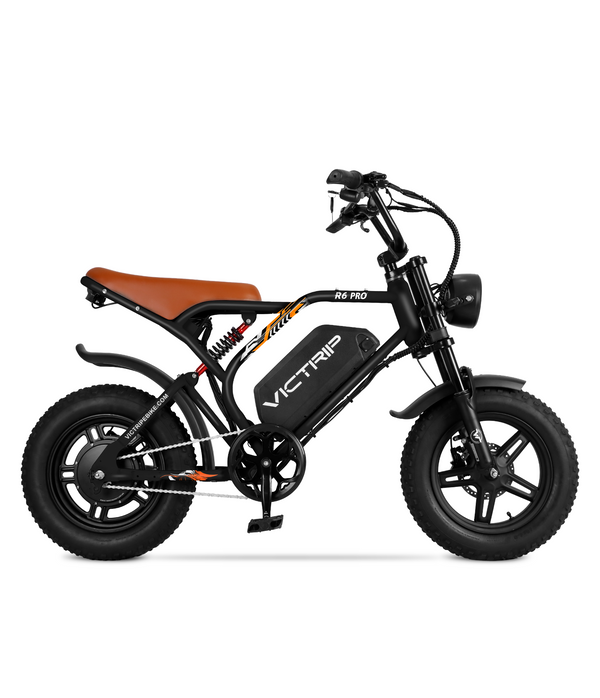
VICTRIP®R6 Pro 1500W Moped Style EBike
$1,099.00
FAQs
My display shows E01 after a rain ride; will it fix itself?
Sometimes — if moisture caused a temporary connector fault, drying and reseating connectors can clear it. Power-cycle the system after drying. If E01 persists, get a shop to inspect connectors and controller.
The battery shows full LED but the bike shuts off under load — is the battery dead?
Not necessarily. The BMS might be cutting output due to cell imbalance or high internal resistance. Get the pack tested by an authorized service or retailer.
Can I fix sensor codes (like torque sensor errors) at home?
Basic fixes like tightening bolts, reseating connectors, and recalibration via the app often work. Component replacement or calibration tools usually require a shop.
Is it safe to ride with an intermittent error code?
No — intermittent electrical faults can cause sudden power loss. If assist cuts in and out, stop riding and diagnose before returning to traffic.
My motor hums but won’t engage — what should I check?
Check the kill switches (brakes), battery voltage under load, and motor connectors. If the motor hums without engagement, it could be a controller or motor winding issue.


Share:
Best E-Bikes to Buy as New Year Gifts in 2026
Is a Folding Electric Trike Worth It? Pros, Cons, and Real Use Cases
2 comments
Hi Warren,
Sorry to hear you’re having trouble with your e-bike!
Error 30 usually indicates a communication error between the display and the controller. Before replacing the controller, you can try these quick troubleshooting steps:
1. Check the connections: Inspect all cables and connectors between the display, throttle, and controller. Make sure none are loose, bent, or damaged.
2. Inspect for moisture/corrosion: Unplug the main connector, check for any water or debris, and plug it back in tightly.
3. Power cycle: Turn off the battery, wait a few minutes, and turn it back on.
If the error persists, you likely need a replacement controller or display compatible with your specific motor system (often KT or King-Meter systems depending on the model).
Hope this helps you get back on the road soon!
My Micargi Cyclone display shows ERROR 30, I’m unable to get any help from Micargi. Can anyone help me, get a new controller? Please help